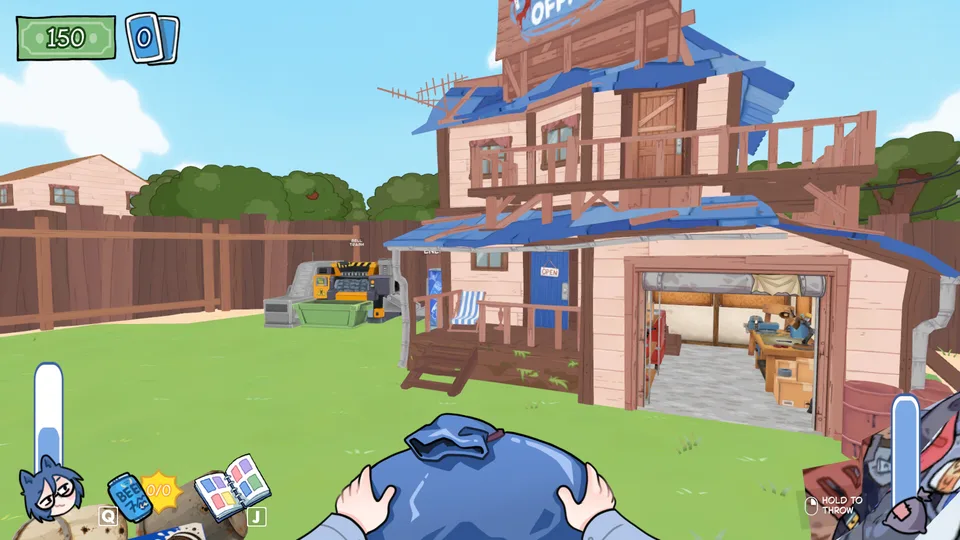
Can you toggle trash collection instead of holding the mouse?
No built-in hold-to-toggle collection or auto-pickup option is documented in the official notes reviewed on September 6. A September 3 Steam reply specifically requests a single click to start continuous collection instead of keeping the mouse button held.
The announced free update has no final feature list, and the September 5 beta targets loading failures, crashes, and broken saves. Neither announcement confirms a collection toggle. Check the controls shown in your installed build; an input-automation script is a separate tool, not a KOTAMON setting.
Does KOTAMON have auto pickup or toggle collect?
The reviewed official notes do not document either option. Players have requested one-click continuous collection, but it is not a confirmed feature of the planned free update or the loading-fix beta.
Is mouse smoothing the hold-to-toggle setting?
No. Mouse smoothing changes camera movement. The collection-toggle request concerns keeping the pickup input active after one click.
How do you change mouse sensitivity in KOTAMON?
Open Settings and adjust the visible mouse-sensitivity control, then test it in the yard. A current player reports that even the highest setting still feels slow, and no official extra-range launch argument is published.
Install the August 22 update or newer as well: it adds an in-game mouse-smoothing switch and FOV control, so camera feel can be tuned without editing game files.
| Setting | Current answer |
|---|---|
| Mouse smoothing | Can be turned off in the game settings after the August 22 update. |
| Field of view | Can be changed in the same current settings menu. |
| Mouse sensitivity | Use the in-game slider. If 100% is still too slow, the current official notes do not publish a wider range. |
| Resolution | The announcement does not add a resolution selector, and players continue to report only fullscreen/windowed choices. |
A safe order for camera changes
- Update and restart the game so the new controls are present.
- Open Settings and turn mouse smoothing off if you want direct camera movement.
- Adjust FOV in small increments and test it in the yard before changing anything else.
- Change one control at a time so you can tell which setting improved or worsened the feel.
Motion sickness or color discomfort
A recent Steam discussion is titled “Motion sickness from the color.” This is a real accessibility report, but the available evidence does not identify one visual effect as the cause or establish a fix that works for everyone.
The latest official settings update documents two relevant controls: mouse smoothing can be turned off and FOV can be adjusted. Change one at a time, test briefly, and keep the previous value so you can reverse a change that feels worse.
The official notes do not announce a dedicated color, bloom, post-processing, or motion-sickness control. Avoid copying graphics-file edits from another Unity game; there is no confirmed KOTAMON-specific color fix to publish yet.
Can you rebind keys or use arrow keys?
The August 22 settings announcement covers mouse smoothing and FOV, but it does not announce full key rebinding. A left-handed player also reports being unable to move the movement controls to the arrow keys.
If the current Settings screen still has no binding list, there is no in-game arrow-key route to configure. Recheck after each update because a future patch can add the control without changing older forum answers.
Controller, Steam Deck, and Steam Link workaround
Current KOTAMON players report incomplete native controller coverage. Valve’s official Steam Input documentation provides a reversible fallback: legacy layouts can map controller inputs to keyboard keys and mouse actions even when a game does not expose native Steam Input actions.
- Connect the controller, then open KOTAMON in the Steam Library and open its controller layout or configuration screen.
- Start from a keyboard-and-mouse or legacy template rather than assuming every gamepad action is already covered.
- Map movement, looking, interaction, and the other keyboard prompts visible in your current build.
- Assign the keyboard Q action to a reachable controller button; one Steam Deck player specifically reports that Q was the missing action needed for beer.
- Test the layout in the yard before a long session, then keep the per-game configuration so it does not alter unrelated games.
Fullscreen resolution workaround
For a fixed fullscreen resolution, one Steam player reports success with Unity launch arguments. In Steam, open KOTAMON Properties, find Launch Options, and enter the example below for 2560×1440 fullscreen.
-screen-width 2560 -screen-height 1440 -screen-fullscreen 1Can you add your own music to KOTAMON?
No official custom-music import feature, MP3 support, or watched music folder is documented for the current build. A current Steam thread asks the developer to add personal-file playback, which makes it a feature request rather than a hidden setting.
Current replies suggest lowering the in-game music and running a trusted media player in the background. That keeps personal files outside KOTAMON and does not replace the radio or collectible audiotapes.
- Open KOTAMON’s Audio settings and lower or mute the in-game music if that control is visible in your current build.
- Play music through a media player you already trust and use Windows volume controls to balance it with game audio.
- Do not create an undocumented KOTAMON music folder or replace game assets based on instructions for a different Unity game.
Can KOTAMON play custom music or MP3 files?
No official import feature or supported audio format is documented. The current Steam topic is a feature request, not instructions for an existing option.
Where is the KOTAMON custom music folder?
No official watched folder is published. Do not copy paths from other Unity games or modify KOTAMON assets without a source for the current build.
Are custom songs the same as KOTAMON audiotapes?
No. Audiotapes unlock the game’s own radio music. Personal-file playback is not documented as a current feature.
Why does KOTAMON stutter when the BGM changes?
Several players in a current Steam thread describe a brief freeze immediately before the background track changes. Reports include an M.2 NVMe installation, so the thread does not support blaming a slow drive alone. There is no developer diagnosis or published fix yet.
Use the timing as a troubleshooting clue, not a proven cause. Lower or mute the in-game music or radio, play until a normal track change would occur, and compare the result. If the hitch remains, restore the setting and report the game build, hardware, and whether it happens at every song change.
Why does KOTAMON freeze before the music changes?
Multiple current players report a brief stutter at that moment, but no official cause is published. Test the in-game music or radio setting, then report the build and hardware if the symptom repeats.
Does moving KOTAMON to an SSD fix BGM stutter?
The current discussion includes the same symptom on an M.2 NVMe installation, so storage type alone is not an established cause or fix.
Use reversible settings first
The same discussion includes Windows Registry edits, but they are unnecessary for a first attempt and harder to undo safely. Use the current in-game controls and the removable Steam launch option before considering system-level changes.
Can I disable mouse smoothing in KOTAMON?
Yes. The August 22 update added a mouse-smoothing switch to the in-game settings.
Can I change KOTAMON FOV?
Yes. The same update added an FOV control in Settings.
Does KOTAMON have a motion-sickness or color-accessibility mode?
No dedicated mode is announced in the latest official settings notes. A current player reports color-related motion sickness, but the specific trigger and a universal fix are not established.
What can I try if KOTAMON causes motion sickness?
Turn off mouse smoothing or adjust FOV, changing only one setting at a time and testing briefly. Restore the previous value if the change feels worse; no KOTAMON-specific color fix is confirmed.
Can I choose a windowed resolution?
The current official update does not publish a free window-size control. A reversible fullscreen launch option is reported to work, but it does not create a freely resizable window.
Can I rebind KOTAMON keys in game?
The current settings notes do not announce full key rebinding, and players are still requesting it. Check the binding screen again after every update.
Can I use arrow keys or a left-handed layout?
A current left-handed player reports that movement could not be moved to the arrow keys. Until a binding screen appears, use a trusted external mapping you already control or wait for an in-game option.
What is the Q key used for in KOTAMON?
Current controller and Steam Deck reports identify Q as the keyboard action needed for beer. Include Q when building a Steam Input layout.
Does KOTAMON support controller, Steam Deck, or Steam Link?
Players report incomplete native coverage and use Steam Input keyboard-and-mouse layouts as a workaround. Map every required prompt, including Q, and keep an escape or menu action available.
How do I change KOTAMON mouse sensitivity?
Use the mouse-sensitivity slider in Settings. If the maximum still feels slow, no wider official range is currently published; report the setting, mouse DPI, and game version.